




































































Waste Ink Pad Reset for Epson® PrintersAlternative to WIC Reset Utility
Clear errors E-11, E-10, and W-01 in 2 minutes. Looking for WIC Reset Utility or a WIC Reset Key? WINK Reset PRO is a modern service tool that safely resets the waste ink pad counter on your Epson printer via USB cable.
Why Choose WINK Reset PRO Over Classic WIC Reset Utility?
Both tools achieve the same service objective - resetting the waste ink counter (WIC / Waste Ink Counter) on Epson printers. Here is an objective comparison of technical and practical differences:
| FEATURE | WINK Reset PRO Modern service tool | WIC Reset Utility Classic WICReset utility |
|---|---|---|
1500+ Supported Printer Models | YES | YES |
Resets Counter to 0% Main pad, platen pad (borderless printing), and clears service error | YES | YES |
Free Trial Reset up to ~80% | YESTry for Free | YES |
Works via USB and Wi-Fi | YES | YES |
Digital Code Signing & Verified Publisher Identity verified by Certificate Authority with guaranteed file integrity | YES | NO |
User Interface & Guidance | User-friendly interface with real-time on-screen guidance | Outdated, unintuitive legacy interface |
Technical Support Response Time | Advanced telemetry. If you encounter issues, send us an email and our team instantly analyzes printer connectivity to resolve it | Time-consuming guesswork and manual troubleshooting attempts |
Key Purchase & Payment Options | Direct purchase in your local currency, instant automated key delivery 24/7 | Payment in USD or via third-party resellers |
Supported Operating Systems | Windows 10 / 11 macOS version currently in development | Windows, macOS, and Linux |
1500+ Supported Printer Models
Resets Counter to 0%
Free Trial Reset
Works via USB and Wi-Fi
Digital Code Signing & Verified Publisher
User Interface & Guidance
User-friendly interface with real-time on-screen guidance
Outdated, unintuitive legacy interface
Technical Support Response Time
Advanced telemetry. If you encounter issues, send us an email and our team instantly analyzes printer connectivity to resolve it
Time-consuming guesswork and manual troubleshooting attempts
Key Purchase & Payment Options
Direct purchase in your local currency, instant automated key delivery 24/7
Payment in USD or via third-party resellers
Supported Operating Systems
Windows, macOS, and Linux
View all supported models (1732 devices)
These printers feature a replaceable maintenance cartridge with an electronic chip. Software reset clears the internal sponge counter (Platen Pad). If the main Maintenance Box is full, the cartridge must be physically replaced or reset using a hardware chip resetter.
| Message / Error Code | What does it mean? | Solution |
|---|---|---|
Platen Pad Error e.g. E-11, W-01 | Full internal sponge counter on the mainboard | ✓WINK Reset PRO 100% software reset via USB |
Maintenance Box e.g. 034841, 034842 | Full replaceable maintenance cartridge with chip | ⚠️Cartridge Replacement New cartridge or hardware resetter |
Step-by-Step Reset Guide
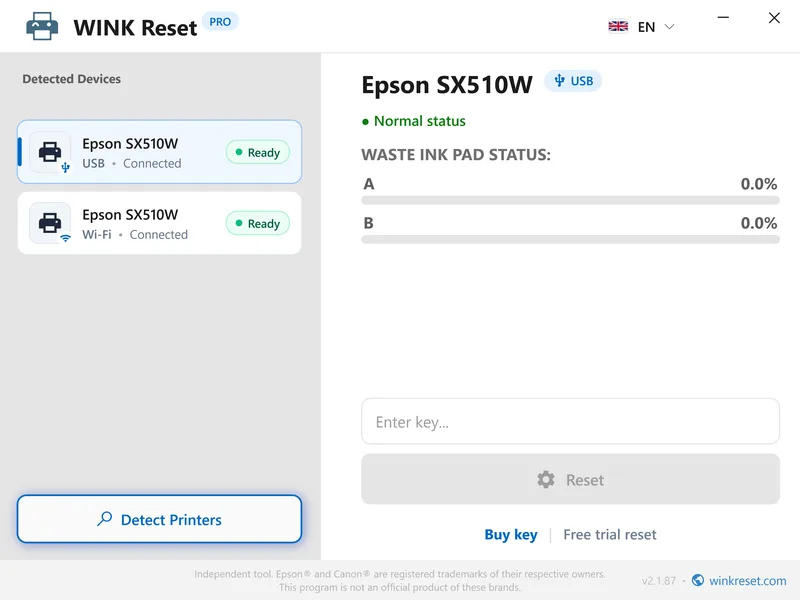
See the full waste ink absorber reset procedure in WINK Reset PRO:
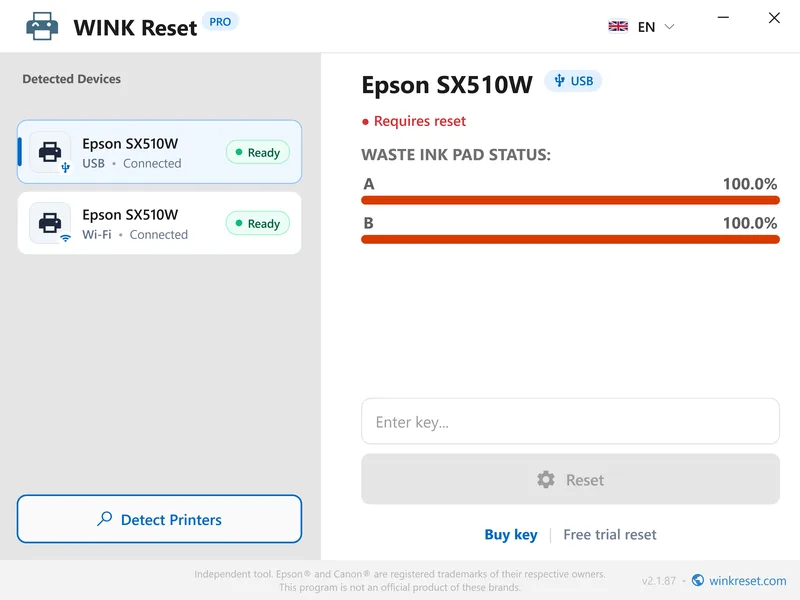
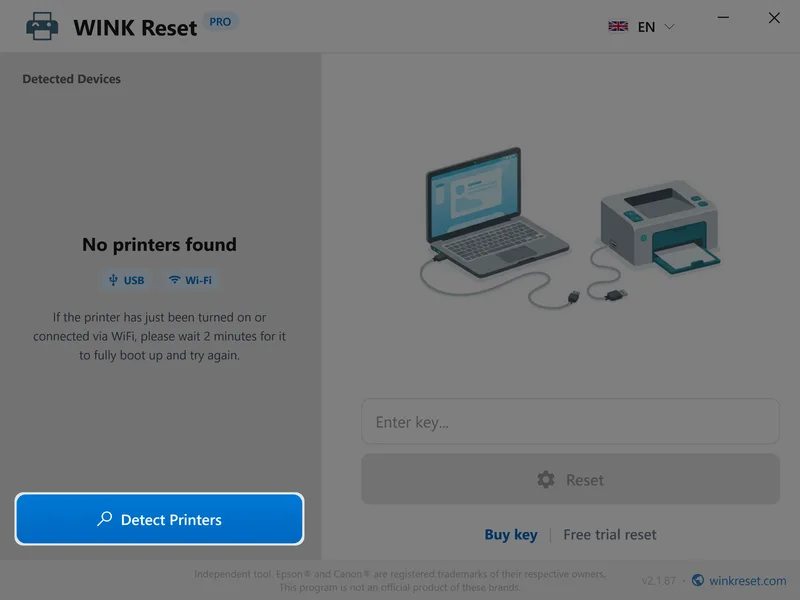
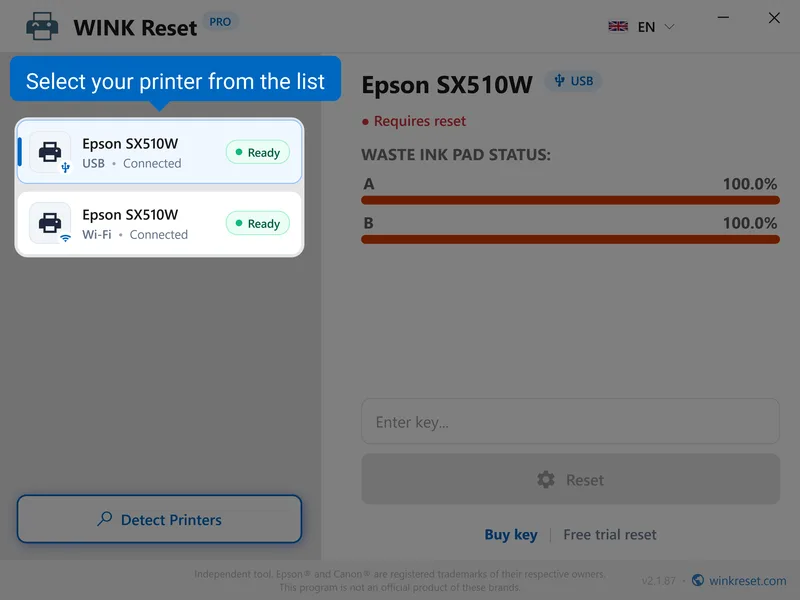
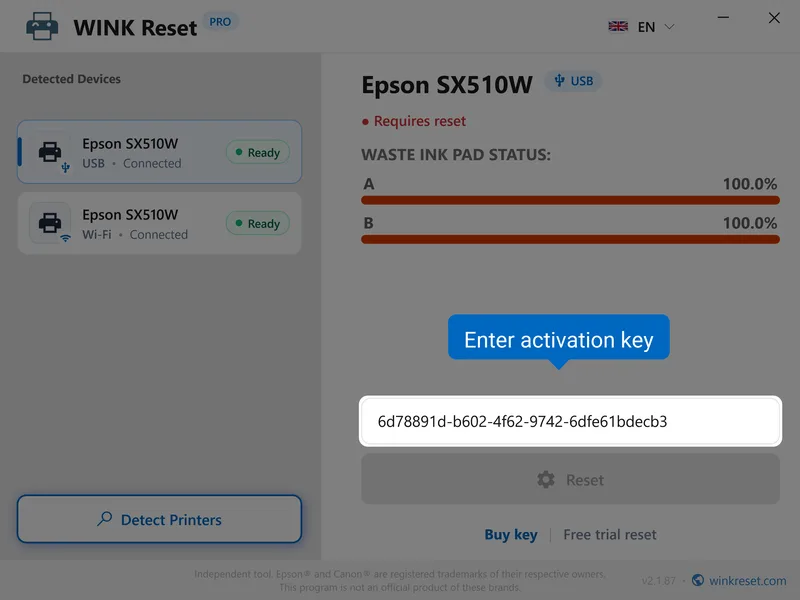
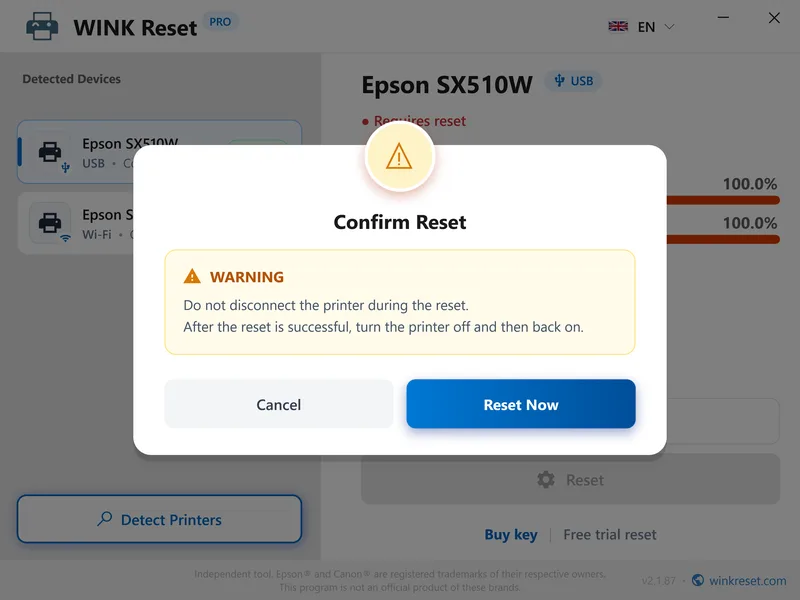
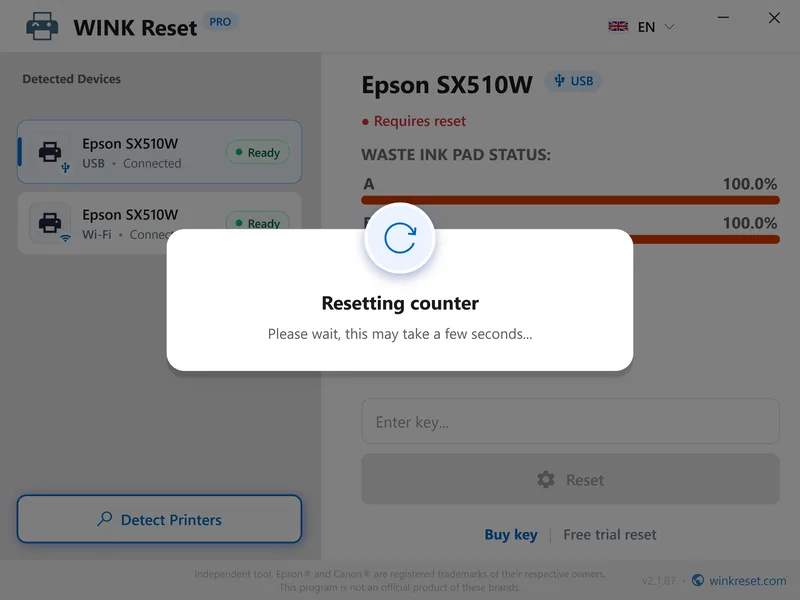
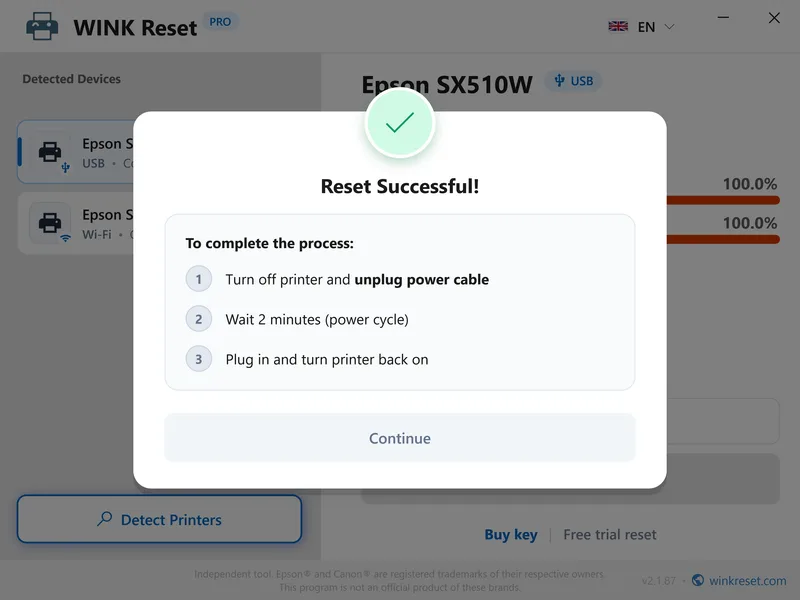
WINK Reset Interface - Safe waste ink pad & reset WIC procedure (Epson / Canon)
Waste Ink Pad Reset Key
A one-time key allows you to immediately reset the absorber counter to 0% for a single device. The transaction is processed automatically via encrypted payment channels.
All major cards & local payments on next screen
Error Codes Fixed by WINK Reset
Verify the error code on your Epson or Canon printer:
| Device Error Code | Description and Technical Meaning |
|---|---|
| E-11 / E-10 | The operating life of the ink absorbing pad has come to an end (Waste Ink Pad Counter Full). |
| W-01 | Service required. Contact Epson support (internal parts of the printer are worn out). |
| 5B00 / P07 / 5B02 | The ink absorber is full. Total printer lock (Canon equivalent of Epson's service required). |
| 1700 / E08 / 1702 | The ink absorber is almost full. Printing can be temporarily resumed by pressing the Resume/OK button. |
| 7 or 8 LED Flashes | Visual error indicator (alternating orange/green flashes) for Canon printers without an LCD screen, indicating waste ink issues. |
| LCD / Driver Message | The printer's ink pads are at the end of their service life / A part inside your printer is at the end of its life. |
| Software Lock | Ink pad reset required – absorber counter has reached its critical value (100%). |
Knowledge Base & Technical Guides
Technical guides and step-by-step solutions.
Epson Adjustment Program Free Download – Security Risks, Malware Alerts & Safe Alternative
Looking for Epson Adjustment Program free download on forums or warez sites? Learn why Windows Defender blocks these files and discover a certified, safe alternative with a free trial.
Epson Waste Ink Pad Reset Free – Trial Reset to 80% & Truth About Absorber Sponges
Epson printer locked with error “ink pad is at the end of its service life” (Error E-11)? Discover how the free 80% trial reset works and the truth about sponge capacity.
Epson Printer Reset Button Combination – YouTube Myths vs. Real Counter Reset
Does holding Power and Stop buttons reset waste ink pad errors on Epson EcoTank printers? Explore the technical facts and the genuine working reset procedure.
Frequently Asked Questions
Epson Waste Ink Reset & Alternative to WIC Reset Utility (FAQ)
How does WINK Reset PRO differ from the classic WIC Reset Utility (WICReset)?
Both tools achieve the same service objective - resetting the waste ink counter (WIC / Waste Ink Counter) memory on Epson and Canon printers. WINK Reset PRO is an independent, modern alternative to the legacy WIC Reset Utility. Our software features official digital code signing (Code Signing) ensuring verified publisher security, a built-in step-by-step diagnostic assistant, and direct key purchase in local currency directly from the developer. Note: Users searching for 'WIC Reset Key' or 'WIC Reset Utility code' should remember that each software uses its own dedicated authorization servers - keys purchased here work exclusively in the WINK Reset PRO application.
Do I need to physically clean or replace the waste ink pad before performing a reset?
WINK Reset PRO is designed as the concluding software step of printer maintenance. After inspecting, cleaning, or replacing the saturated waste ink pads inside your printer, the tool performs a safe counter reset, permanently restoring the device to normal operational status.
Is performing a reset safe for my printer?
Yes, the procedure is 100% safe. The utility only performs a safe reset of the waste ink pad counter without altering printhead calibration, factory settings, or Wi-Fi configurations.
Which printers are supported and can I perform a reset on my model?
WINK Reset PRO supports over 1,700 inkjet printer models. Frequently reset devices across the UK, US, and international markets include:
• EcoTank ET Series : ET-2820, ET-2850, ET-2800, ET-2720, ET-4800, ET-8550
• EcoTank L Series : L3250, L3150
• Expression Series : XP-2100, XP-3100
Before purchasing a full key, you can verify your device in seconds using our model checker above or download the software to run a free counter read and trial reset to 85%. Also explore our practical repair guides and knowledge base.
What is a complete counter reset and do I need to buy multiple keys?
No, you only need one single reset key. Modern printers store waste ink data across several sections (the main waste ink pad and the borderless platen pad). WINK Reset PRO performs a comprehensive counter reset for all associated sections simultaneously in one click, permanently clearing the service error code.
What if the free trial reset to 85% does not work?
If the reset to 85% does not resolve the error, it indicates that the problem may be mechanical (e.g., sensor malfunction or physical overflow of the waste ink tank). In this case, a full key is not needed, and the printer may require mechanical service.
How quickly will I receive my reset key after purchase?
Your reset key is generated and delivered instantly to your email address right after payment (available 24/7).
How to uninstall WINK Reset PRO?
To uninstall the software, open the Start menu and select Settings > Apps. Find WINK Reset PRO in the list of installed applications and click Uninstall. The removal process takes only a few seconds and leaves no trace.
Do you offer wholesale packages for repair shops and key resellers?
Yes! We offer tiered wholesale packages with volume discounts, instant invoicing, and flexible master Multi-Key formats for technicians. Check out our B2B Wholesale Portal.
Do you have an affiliate or creator partner program?
Yes! Content creators, tech bloggers, and repair portals can earn commissions on all referred sales. Learn more on our Affiliate Program Page.